- At a Glance
- What Is TrueLook?
- Who It Is For in Construction
- Live Viewing and Stakeholder Access
- Time-Lapse and Marketing Deliverables
- Security-Minded Workflows
- Fixed vs. PTZ Cameras
- Integrations and Permissions
- Setup, Mounting, and Connectivity
- Pricing and Value
- Privacy, Neighbors, and Jobsite Etiquette
- Alternatives to Consider
- Conclusion
If you are building or renovating, you already know the drill. Jobsites can be spread across different neighborhoods, weather can change quickly, and material theft is always a concern on active construction sites. Add out-of-state investors, lender draw requests, and busy project schedules, and remote monitoring becomes more than a convenience.
This review looks at TrueLook from the perspective of real estate teams, including developers, builders, investors, and agents. Below, you will find what TrueLook offers according to vendor materials, where it can help on property projects, and where expectations should stay realistic.
Features and services can vary by camera model and service level, so treat this as a practical overview rather than a technical spec sheet.
At a Glance
Here is the short version before getting into the details.
- Best for: Owners, small developers, builders, and listing agents who want straightforward live viewing and shareable time-lapse content for progress updates, lender communication, and marketing.
- Not ideal for: Teams expecting a standalone, full-scale security system or groups managing complex multi-building developments that need more advanced surveillance coverage.
- Setup considerations: You will need a stable mounting point, reliable power or a generator plan, and strong connectivity at the site.
- Learning curve: Low for basic viewing and sharing. Moderate if you want to fine-tune motion alerts, manage multiple users, or set up project-specific permissions.
If you are comparing options for remote jobsite viewing and progress documentation, vendors like TrueLook offer TrueLook’s Construction Site Cameras, which you can manage online.
What Is TrueLook?
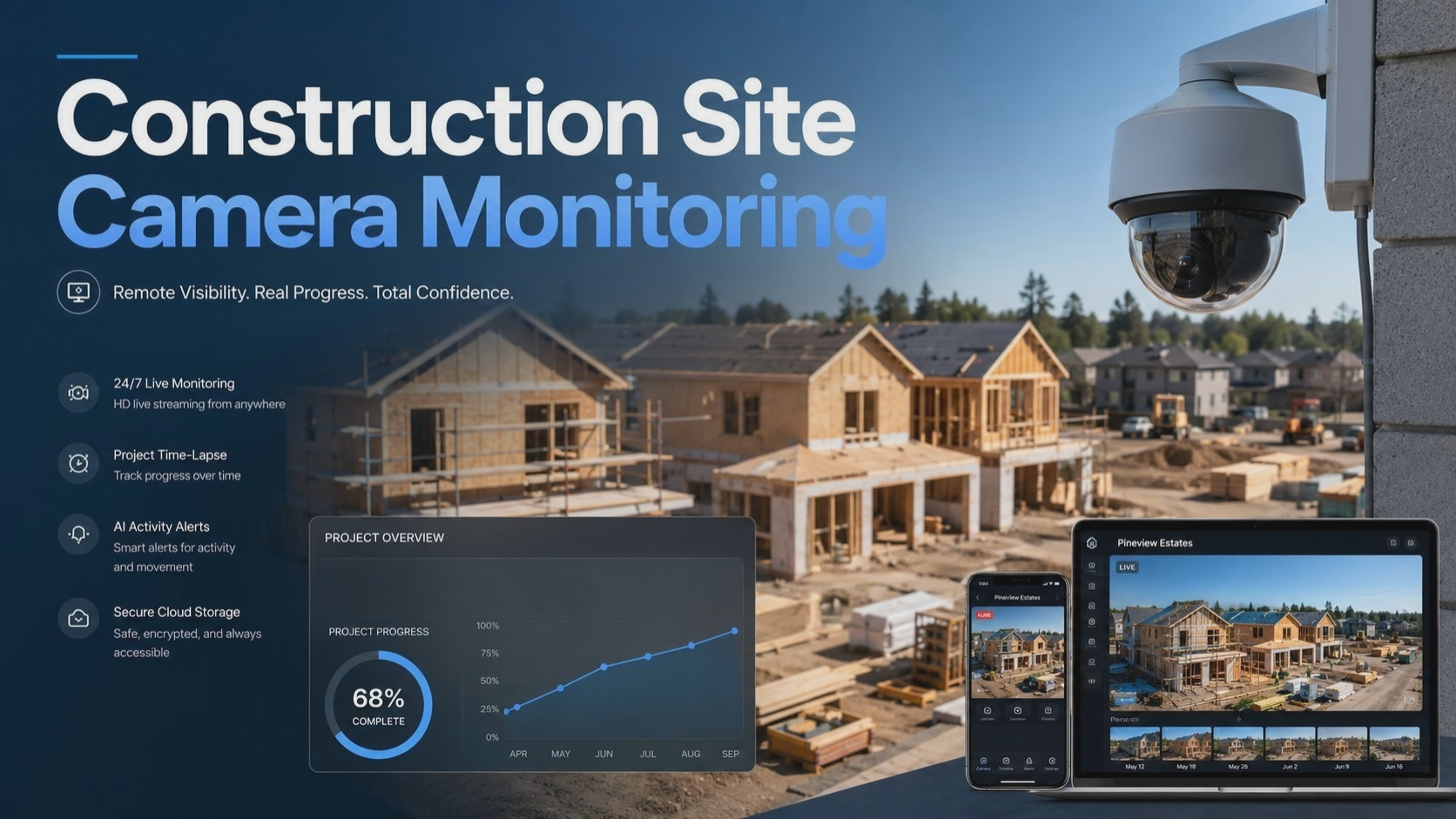
TrueLook is a construction-focused camera platform built around two core uses: viewing a jobsite remotely and creating time-lapse videos of the build process. According to vendor materials, the system includes fixed-position cameras and pan-tilt-zoom cameras, often called PTZ cameras.
Fixed cameras stay pointed at one area, which helps with consistent framing and cleaner time-lapse footage. PTZ cameras can be steered remotely to scan different parts of a site, zoom in on details, or check activity from different angles.
Both camera types feed into a cloud-based platform that users can access from a browser or mobile device. From there, teams can view live feeds, review recorded footage, and share access with partners, lenders, or other stakeholders. The exact tools available depend on the package and deployment, so confirm details with the vendor before choosing a setup.
Who It Is For in Construction
Think about a typical property project: a custom home build, a small infill development, a rental renovation, a value-add flip, or a commercial upfit. In each case, the person funding or overseeing the work may not be on site every day.
Driving across town just to check progress can eat up time fast. For investors who live outside the area, the challenge is even bigger. Remote monitoring can reduce unnecessary site visits, make lender updates cleaner, and give owners a visual record of how the project is moving.
Most jobsites also bring practical challenges, including sun glare, dust, wind, rain, and storm exposure. Warm summers and regular rainfall make camera placement and weather planning especially important. A good camera setup is not just about buying the right device. It is also about choosing the right angle, mount, power source, and connectivity plan.
Live Viewing and Stakeholder Access
The everyday value of live viewing is simple: it gives stakeholders a way to check progress without being physically present.
How It Works
According to vendor materials, users can log in through a browser or app, view a live feed, and grant access to other users. You can also create shareable access so a lender, partner, project manager, or out-of-state investor can check progress without relying on emailed screenshots.
Real Estate Payoff
Quick check-ins can replace drive time. When a lender asks for visual documentation before releasing a progress draw, you can review the feed instead of scheduling a separate site visit.
For investors, this can be especially useful. Instead of waiting for a contractor to send photos, you can see the site for yourself and ask better follow-up questions.
Heads Up
Viewing quality depends on mounting height, site bandwidth, power stability, and camera placement. A camera mounted too low may catch more dust, equipment obstruction, glare, or temporary fencing than actual progress.
Before installation, think about what you really need to see. The best angle is not always the closest angle.
Time-Lapse and Marketing Deliverables
Time-lapse is where jobsite cameras often move from operations tool to marketing asset.
How It Works
The platform captures images at set intervals and turns them into time-lapse videos. According to vendor materials, users can share or download these files for different uses. Fixed-position cameras are especially useful for this because the framing stays consistent from the early stages of construction to the final walkthrough.
Real Estate Payoff
A polished time-lapse of a ground-up build can support social media posts, listing videos, investor updates, and project recaps.
For builders and developers, this can be useful beyond one project. A strong time-lapse can help show the quality of your process, the pace of your work, and the transformation of a property from start to finish.
Agents who sell new construction can also use this type of content to help buyers understand the story behind a home. Developers may reuse the footage in future presentations, investor updates, or marketing materials when it fits the audience.
Heads Up
Camera placement matters. Avoid heavy backlighting, especially during strong morning or afternoon sun. Also be careful not to aim the camera toward neighboring yards, windows, or private outdoor areas that should not appear in marketing footage.
Security-Minded Workflows
Cameras can support security routines, but they should be viewed as one layer of a broader jobsite protection plan.
How It Works
TrueLook markets motion detection, alerting, and security-related features as part of its platform. The basic idea is that you receive notifications about activity, review footage, and decide how to respond.
Real Estate Payoff
After-hours awareness can help with incident documentation. If materials go missing overnight, recorded footage may support insurance claims, police reports, or conversations with your contractor.
For smaller projects, this can be helpful when expensive materials, appliances, fixtures, or tools are left on site before installation.
Heads Up
This is not a replacement for a dedicated security system. Wind-blown tarps, moving equipment, animals, delivery activity, and workers arriving outside normal hours can all trigger alerts.
If your site has a high theft risk, pair camera monitoring with lighting, locked storage, fencing, clear access control, and other on-site protections. Set alert windows for after-hours periods so daytime construction activity does not bury you in notifications.
Fixed vs. PTZ Cameras
This is one of the most important choices to make before installation.
Fixed cameras provide a steady, unchanging frame. That works well for time-lapse, progress documentation, and consistent reporting. If your main goal is to show a full build from start to finish, a fixed camera is often the cleaner option.
PTZ cameras let you pan, tilt, and zoom. That can be useful if you need to check different parts of the site, zoom in on specific work areas, or cover a wider property from one camera location.
The tradeoff is coverage. A PTZ camera pointed at one side of your site might miss activity on another side. A fixed camera captures everything in its frame, but only that frame.
For many residential projects, one fixed camera covering the main build area may be enough. Larger sites may benefit from a PTZ unit, multiple fixed cameras, or a combination of both.
Integrations and Permissions
Vendor materials reference integrations with project management tools, though the specific platforms available may vary by package. If your team already uses construction software to track schedules, notes, photos, and punch-list items, ask whether TrueLook connects to the tools you already use.
Keeping visuals near the construction timeline can simplify reporting and reduce the back-and-forth of emailing screenshots.
Permissions also matter. A lender may only need view access. A project manager may need broader control. A marketing team may only need finished time-lapse files. Set roles carefully so each stakeholder gets the visibility they need without opening up more access than necessary.
Setup, Mounting, and Connectivity
Mounting options commonly include poles, trailers, or the structure itself. Avoid spots prone to vibration, such as areas near heavy equipment paths, and consider the sun’s position to reduce glare.
In most orientations, facing the camera north or northeast can help reduce glare, but verify the angle at your actual site before locking in the final placement.
Power and connectivity are just as important as the camera model. Confirm whether you have available power, need a generator, or should consider another power plan. Also confirm how the camera will connect and whether coverage is reliable at your specific address.
This matters for projects outside the most connected areas or in places where cellular service can vary by carrier.
Weatherproofing is expected for an outdoor construction camera, but storm prep still matters. Secure mounts before severe weather, check the angle after strong wind or heavy rain, and have a plan for quick adjustment if site conditions change.
Pricing and Value
Specific pricing is not listed here because TrueLook packages can vary based on camera type, camera count, data retention, alerting features, connectivity, service level, and project duration.
The most useful approach is to request a quote based on your site conditions and timeline.
Before comparing quotes, decide what matters most:
- Live viewing
- Time-lapse quality
- Alert features
- Data retention
- User permissions
- Connectivity
- Installation support
- Marketing deliverables
A small residential project may not need the same setup as a larger commercial site. Match the package to the problem you are trying to solve.
Privacy, Neighbors, and Jobsite Etiquette
A few common-sense practices can prevent problems.
Post signage letting people know the site is monitored. Angle cameras away from neighboring yards, windows, and private outdoor areas. Coordinate with your general contractor and subcontractors so they know cameras are in place and understand the purpose.
Be especially careful with audio recording, private spaces, and any camera angle that could capture areas where someone would reasonably expect privacy. This is not legal advice, so consult a qualified professional if you have specific questions about privacy, notice, recording rules, or jobsite camera use.
If your project is in an HOA-governed community, review any relevant rules about exterior equipment before installation.
Alternatives to Consider
TrueLook is not the only option in the construction camera market. OxBlue and EarthCam are two other well-known names, and Sensera Systems also serves smaller jobsite needs.
Each platform has different strengths around coverage, time-lapse tools, pricing structure, support, deployment, and security features.
When comparing vendors, focus on your actual site conditions:
- How large is the project?
- How reliable is power?
- How strong is the internet or cellular signal?
- How many stakeholders need access?
- Do you need time-lapse, live viewing, security alerts, or all three?
- Will the footage be used only internally, or also for marketing?
A platform that works well for a large commercial site may be more than a smaller residential renovation needs.
Conclusion
TrueLook is a practical option for construction teams that want remote visibility into active builds without adding a complicated workflow. Live viewing and time-lapse are the clear strengths, especially for progress draws, stakeholder updates, investor communication, and marketing content.
The security-related features can add awareness, but they work best alongside other jobsite protections.
If you are a custom home builder, a small developer working on infill projects, a real estate investor monitoring a renovation, or an agent involved in new construction, this type of platform can save time and reduce unnecessary site trips.
Just confirm the package details, plan camera placement carefully, and account for local conditions such as sun exposure, power access, wind, rain, connectivity, and nearby properties before installation.